
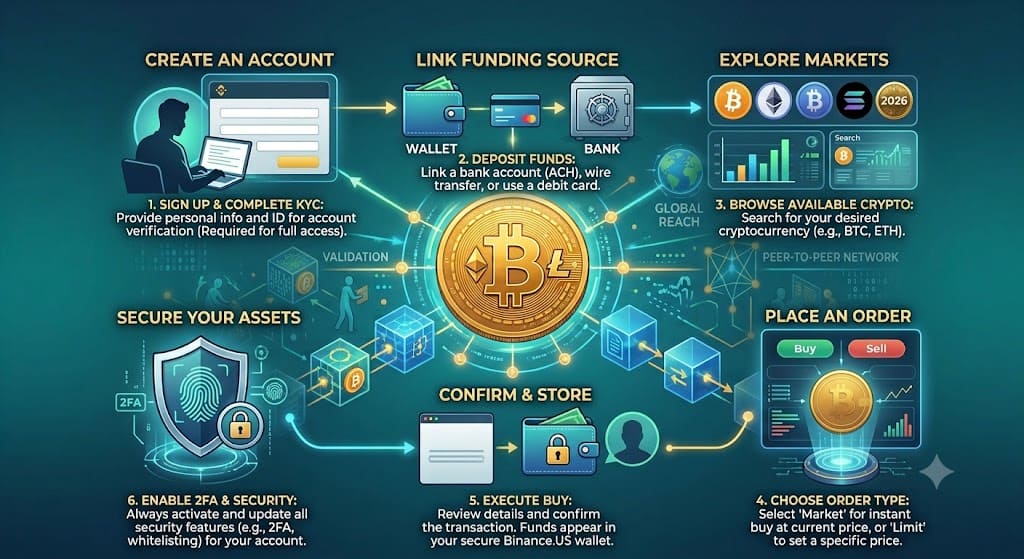
I opened my Binance.US account on a Tuesday afternoon expecting the usual half hour of uploading documents and waiting around. It took less than ten minutes to get verified, and my first buy order filled before I’d finished reading the confirmation screen. That’s the short version of this whole guide: sign up, verify your identity, fund your account, and place an order. Five steps, no crypto experience required.
The slightly longer version is what this article covers, because a few of those steps have real decisions attached to them. How you fund your account changes what you pay in fees. Your state determines whether you get full USD access or crypto-only access. And “buy crypto” on Binance.US actually means choosing between two different order types that cost very different amounts.
What You’ll Need Before You Start
Binance.US is a regulated exchange, so it asks for the same information most US banks and brokerages require:
- A government-issued photo ID (driver’s license, passport, or state ID)
- Your Social Security number
- A US residential address in a supported state
- A phone number and email for two-factor authentication
- A funding method: a US bank account for ACH transfers, or a debit/credit card
Have your ID ready before you start the signup form. Most delays in the verification step come from blurry photos or a name that doesn’t exactly match the ID, not from the process itself being slow.
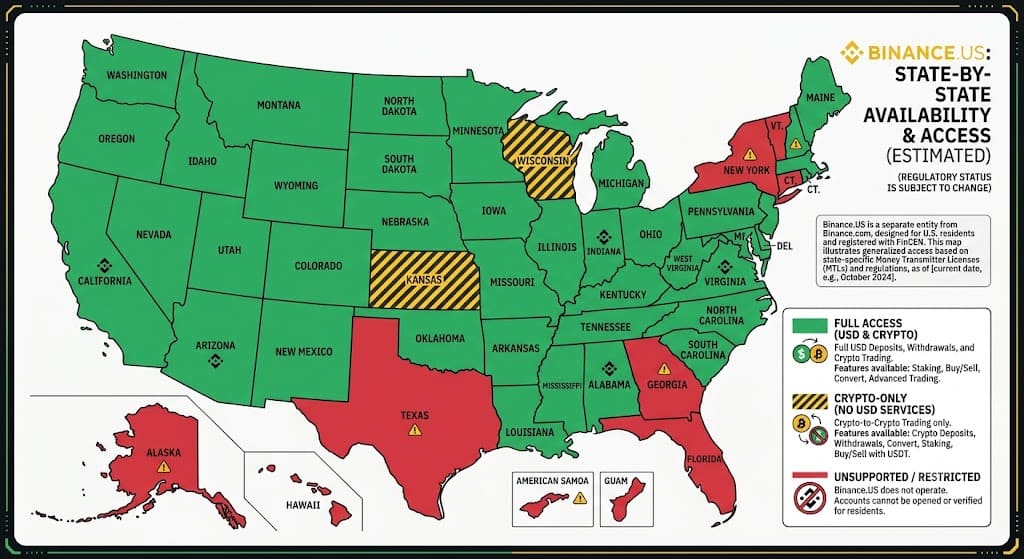
Is Binance.US Available in Your State?
This is worth checking first, because it’s the one thing that can stop you before you even start. Binance.US doesn’t operate the same way in every state.
As of Binance.US’s own support documentation, the exchange fully supports residents of most states, including California, Florida, Illinois, Pennsylvania, and 33 others. Kansas and Wisconsin residents get crypto-only access, meaning you can trade but can’t deposit or withdraw USD directly. New York, Texas, Vermont, Connecticut, Georgia, and several other states are unsupported entirely, so you won’t be able to register or verify an account if you live in one of them.
If you’re in an unsupported state, changing your registered address later doesn’t help unless you’ve actually moved. Binance.US ties account access to your real residential address, not a mailing address or VPN location.
Step 1: Create Your Account
Head to Binance.US and sign up with your email address (or a Google/Apple account) and a password. You’ll get a verification email or code first. This part is identical to signing up for almost any online service, and it takes about a minute.
Step 2: Verify Your Identity (KYC)
This is the step people worry about most and the one that surprised me by being fast. Binance.US will ask for:
- Your legal name, date of birth, and address
- A photo of your government ID (front and back)
- A selfie, usually taken through your phone camera, to match against the ID
The system runs an automated check first. If everything matches cleanly, most verifications clear in a few minutes. If your documents get flagged for manual review, it can take one to three business days. I’ve seen both happen to people I know, and the difference usually comes down to photo quality rather than anything about the person’s actual eligibility.
Step 3: Fund Your Account
This is where your choice actually costs you money, so it’s worth slowing down here. Binance.US supports a few funding methods, and they are not close to equal in cost.
| Funding method | Typical fee | Speed |
|---|---|---|
| ACH bank transfer | Free | 1-3 business days to clear |
| Wire transfer | ~$10-15 (varies by bank) | Same day to next day |
| Debit or credit card | Around 3.75% of the deposit | Instant |
| Crypto deposit from another wallet/exchange | Free (network fees may apply) | Varies by network |
Fees as of mid-2026, based on Binance.US’s published fee schedule. Card fees and wire costs can change, so check the current rate on Binance.US before you deposit.
If you’re funding with more than a small test amount, ACH is the only method that doesn’t quietly eat into your first purchase. A card deposit is convenient, but on a $500 deposit you’d lose close to $19 before you’ve even bought anything. I only use card funding for a quick first deposit under $50 just to try the platform, and I move to ACH for anything real after that.
Step 4: Buy Your Crypto
Once your funds have landed, you’ve got two ways to actually buy on Binance.US, and they carry very different costs.
Simple/instant buy (sometimes called One Click Buy and Sell). You pick a coin, enter a dollar amount, and confirm. It’s the fastest option and the one most beginners default to, but the spread and fee built into the instant price are noticeably higher than trading on the order book.
Advanced (spot) trading. You place a market or limit order on the actual trading pair, like BTC/USD. It takes one extra screen to get comfortable with, but it’s where Binance.US’s headline low fees actually apply.
Binance.US’s spot trading fees sit at 0% for maker orders and 0.02% for taker orders on every pair, for every user, with no volume requirements or subscription fees. That’s the rate whether you’re buying $50 or $50,000.
Fee Comparison: Binance.US vs Other US Exchanges
Here’s how that compares to the entry-level fees at other major US platforms, based on Binance.US’s own April 2026 fee comparison:
| Exchange | Maker fee | Taker fee |
|---|---|---|
| Binance.US | 0% | 0.02% |
| Kraken | 0.25% | 0.40% |
| Crypto.com | 0.25% | 0.50% |
| Coinbase (standard) | 0.60% | 1.20% |
| Gemini | 0.60% | 1.20% |
Rates as of April 2026. Coinbase and Gemini’s entry-level tiers apply to smaller trading volumes; fees drop with higher monthly volume on most exchanges. Always check the live fee page before trading, since rates change.
If you’ve ever used Coinbase’s basic app and wondered why your $200 buy showed up worth less than $200, this is why. A 1.2% taker fee on $200 is $2.40 gone before the market even moves. The same trade on Binance.US’s spot market costs about $0.04.
Once you place your order, the crypto lands in your Binance.US account instantly for market orders, or as soon as your limit price is hit.
A Worked Example
Say you’re depositing $1,000 by ACH and buying Bitcoin through spot trading rather than the instant-buy button.
- Deposit: $1,000, no fee, arrives in 1-3 business days
- Taker fee on a $1,000 market buy at 0.02%: $0.20
- Amount of Bitcoin received: roughly $999.80 worth, minus whatever BTC is trading at that moment
Run the same $1,000 through instant buy instead, and depending on the spread, you’d typically end up with somewhere around $10-15 less in actual Bitcoin. It’s not a huge gap on one trade, but it adds up fast if you’re buying regularly.
If you want to see how a recurring deposit or a lump sum grows over time once it’s converted, FinToku’s Currency Converter is a quick way to sanity-check exchange rates before you move larger amounts, especially if you’re comparing USD against a different base currency.
Common Mistakes to Avoid
Using instant buy for every purchase. It’s fine for a $20 test run. For anything you’re doing regularly, the fee difference between instant buy and spot trading adds up over months.
Funding with a card out of habit. The 3.75% card fee is the single most expensive thing about using Binance.US, and it’s entirely avoidable by linking a bank account instead.
Not checking state availability first. If you’re in an unsupported state and try to sign up anyway, you’ll waste time on a verification that was never going to clear.
Skipping two-factor authentication. It takes two minutes to set up and it’s the single biggest thing standing between your account and someone who guesses or phishes your password.
Key Takeaways
- Binance.US signup and identity verification typically takes under 30 minutes if your ID photos are clear and legible.
- Binance.US is fully supported in most US states, offers crypto-only access in Kansas and Wisconsin, and is unsupported in states including New York, Texas, and Vermont.
- ACH bank transfers are free; debit and credit card deposits cost around 3.75% of the amount deposited.
- Spot trading fees on Binance.US are 0% maker and 0.02% taker for all users, well below Coinbase and Gemini’s entry-level rates.
- Using the instant/simple buy button instead of spot trading costs noticeably more per trade due to a wider built-in spread.
Frequently Asked Questions
Is Binance.US safe to use? Binance.US is a US-registered money services business that carries out identity verification and holds licenses in most states where it operates. No exchange is risk-free, so standard precautions still apply: enable two-factor authentication, use a strong unique password, and don’t leave large balances sitting in any exchange account long-term.
How long does Binance.US verification take? Most accounts clear automated verification within minutes. If your documents get flagged for manual review, it can take one to three business days.
Can I buy crypto with a credit or debit card on Binance.US? Yes, but card deposits cost around 3.75% of the amount deposited, making them the most expensive funding method on the platform. ACH bank transfers are free and better suited to anything beyond a small first purchase.
Is Binance.US available in my state? Binance.US supports most states, but New York, Texas, Vermont, Connecticut, Georgia, and several other states and territories are currently unsupported, and Kansas and Wisconsin residents get crypto-only access without USD deposits or withdrawals. Check Binance.US’s current state list before signing up, since availability changes.
What are the fees for buying crypto on Binance.US? Spot trading fees are 0% for maker orders and 0.02% for taker orders on every pair. Instant/simple buy orders cost more due to a built-in spread. Funding fees range from free (ACH) to around 3.75% (card deposits).
How do taxes work when I buy crypto on Binance.US? Buying crypto itself isn’t a taxable event under current IRS guidance; you owe tax when you sell, trade, or spend it at a gain. Binance.US provides transaction history you can export for tax reporting, but this isn’t tax advice, and it’s worth confirming your specific situation with a tax professional.
If you already own crypto and are weighing whether to hold or add to your position, FinToku’s Ethereum investment guide walks through buying, staking, and tax basics for a specific coin rather than the exchange itself.
Once you’ve got your account funded, the fastest way to see this in action is to place a small spot order first, ten or twenty dollars, before committing a larger amount.
Read More
- Is Ethereum a Good Investment in 2026? A US Guide to Buying, Staking, and Taxes
- 6 Best Online Banks With No Monthly Fees in 2026
Disclaimer
This article is for general informational purposes only and shouldn’t be taken as financial, tax, or legal advice. Crypto prices, exchange fee schedules, and state availability all change, and the numbers here are current as of publication, not guarantees. Buying, selling, and holding cryptocurrency carries real risk of loss. Before opening an account or moving money, it’s worth checking Binance.US’s current terms directly and, for tax questions, talking to a qualified tax professional. You can also read FinToku’s full Financial Disclaimer.
Published by Saad Faisal for FinToku (fintoku.com) · Published July 20, 2026 · Updated July 20, 2026 FinToku provides free finance tools and guides to help you make smarter money decisions.